





















Bloxorz – Block Puzzle 3D
There is something incredibly satisfying about solving a spatial puzzle that pushes your logic to the absolute limit. Whether you are killing time on a train ride through London, taking a quick coffee break in Toronto, or unwinding on a quiet afternoon in Melbourne, Bloxorz – Block Puzzle 3D is the perfect mental workout.
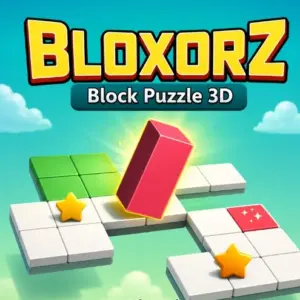
This free, browser-based title takes the classic block rolling formula and drops it into a sleek, modern 3D environment. Your objective is wonderfully straightforward: navigate a rectangular block across suspended platforms and drop it perfectly upright into the red goal hole. However, actually pulling that off requires serious spatial awareness and forward planning.
Master the Grid
The gameplay relies entirely on pure logic. You have to constantly calculate your block’s orientation as it tips and rotates across the tiles. Because the grid is suspended in mid-air, there are absolutely no safety nets. If any part of your block tumbles over the edge, the level restarts instantly, keeping the pressure high from start to finish.
Before you make your first move, you need to read the platform. Look for narrow pathways that will restrict your block’s movement and plan your route to the red tile accordingly.
Manipulate the Switches
To reach the goal, you will often need to reveal hidden paths by triggering specific switch tiles scattered across the board. Knowing how to activate them is the key to conquering the later stages:
-
Soft Switch Tiles: These are fairly forgiving. As long as any part of your rectangular block is resting on or rolling over this tile, it will activate and reveal the connected hidden platform.
-
Hard Switch Tiles: These demand absolute precision. To trigger a hard switch, your block must be standing perfectly upright on that single specific tile. One mistimed roll means you will have to rethink your entire approach.
Developed by GameBiz, this WebGL puzzle game runs flawlessly without any downloads. If you are ready to test your brainpower, start rolling and see if you can beat every stage right here on pok6.
Controls
The inputs are highly responsive and perfectly optimized for both desktop and touchscreen play:
Move Block (Desktop): Arrow Keys or W, A, S, D
Move Block (Mobile): Swipe your finger across the screen